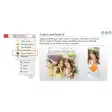
Simplify your life on the web
Whether you’re creating your website or if you like surfing the net and picking up bits and pieces here and there, you should give VMN Toolbox a try.
This unobtrusive and elegant toolbar offers you five major functionalities to pick up images and graphics, in the shape of: screen capture, horizontal and vertical pixel rulers, a colour picker, a magnifying glass and a note taker.
So how do each of VMN Toolbox’s functionalities fair? We were impressed with the web 2. 0 feel and simplicity of each option. To use the colour picker, just drag your cursor to any point of your screen.
You can create your own palette by adding an unlimited number of colours or choosing one from VMN’s own palette. If you’re a web designer, this is useful for picking-up a shade you like and want to use on your website.
Similarly, the pixel ruler will be of interest to webmasters, allowing you to move the horizontal and vertical rulers around your screen to measure the size of elements like photos or logos.
You could use this if you’re creating an advertising campaign or a presentation and you’re not sure of the size you want your graphics and photos to be.
The screen capture option is efficient and accurate, and works by dragging the selected area until you get the image you need and clicking on the capture button.
We were disappointed that you can only save in BMP and JPG, but most users will be content with these options. The magnifier cleverly focuses on where your arrow goes and can amplify from a range of x2 to x10.
The note taker doesn’t really provide anything original but you might enjoy being able to jot down notes that will be available on your desktop.
VMN Toolbox covers useful functionalities to pick that image or detail that you need from the internet and it manages to fit it all in a simple and ingenious interface.
While more experienced users will use separate and more powerful solutions like SnagIt for screen captures or Absolute Color Picker, VMN Toolbox is a great all-in one solution that aspiring web designers and regular internet users will enjoy.

























User reviews about VMN Toolbox
Have you tried VMN Toolbox? Be the first to leave your opinion!